
T–Shirt Design: Custom T–Shirt90.24 - Google Play
You'll be able to see results in few seconds.
Publisher Description
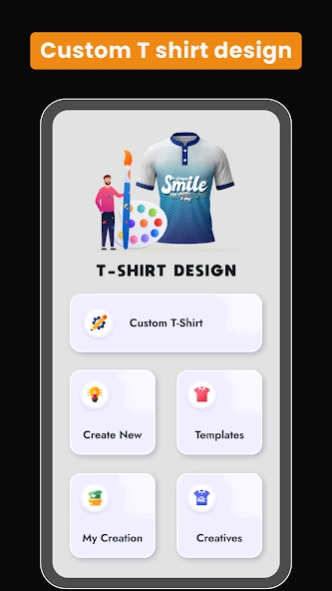


Custom T-shirt design app – make your own tees with text, logos & graphics
T–Shirt Design: Custom T–Shirt– Create Your Own Tees 👕✨
Looking for the fastest and most stylish T-shirt design app?
You’re in the right place! With T–Shirt Design: Custom T–Shirt, you can design unique custom tees in just minutes — no professional design skills required.
Express your creativity and show off your personal style with custom shirts for men, women, and kids. Whether it’s a casual everyday tee, a concert shirt, or a fun design for friends, this T-shirt design app makes it easy.
🌟 Why Choose T–Shirt Design: Custom T–Shirt?
👕 T-Shirt Design Maker:
Designing custom tees has never been easier! Create your own T-shirt mockups with colours, fonts, and images. Smooth and simple design tools for beginners.
T-Shirt Editor & Creator:
Personalize your T-shirt with stickers, logos, or your own graphics. Choose from a wide collection of T-shirt templates and designs, then edit them to make them yours.
Shirt Designer Tools:
Easily drop your favourite designs or photos onto your T-shirts. Perfect for casual tees, concert T-shirts, or fitted styles.
Upload & Customize:
Import your own artwork, or use built-in templates. Add stickers, logos, and graphics to the front or back of your T-shirt. Use your gallery or camera to add photos and backgrounds.
Custom Graphics & Layouts:
Arrange your design the way you want with simple layout tools. Choose from a wide range of T-shirt colours and get a realistic preview before printing.
T-Shirts for Everyone:
Create custom shirts for men, women, and kids. Add unique colours, text styles, textures, and artwork to match any event or personality.
Multiple Categories:
From printed T-shirts to graphic tees, trendy streetwear, or classic looks — explore endless design possibilities.
Text & Typography:
Add text in multiple fonts, colours, and effects. Create bold designs with 3D text, textures, and lettering.
Save & Share:
Save your T-shirt design on your device, edit it later, or share instantly on social media with friends. Great for showing off your work before printing!
Who Is It For?
Whether you’re a beginner just testing out ideas or a creative designer making professional custom tees, this T-shirt creator app makes it simple. Perfect for:
✔️ Personal use
✔️ Family & group events
✔️ School projects
How to Use:
1️: Install the T–Shirt Design: Custom T–Shirt app.
2️: Open the app and choose a T-shirt or template.
3️: Add your logo, text, or graphics.
4️: Adjust the font, size, colour, and layout.
5️: Save or share your design t shirt design.
6️: Now you can print your T-shirt easily anytime.
Get Started Today!
Designing fitted or casual T-shirts is easier than ever. No design skills needed — just pick, place, and preview your custom tee.
Download T–Shirt Design: Custom T–Shirt today and start creating your own custom T-shirts your way.
We’d love your feedback ❤️ Help us improve with your suggestions!
About T–Shirt Design: Custom T–Shirt
The company that develops T–Shirt Design: Custom T–Shirt is MaveenLabStudio. The latest version released by its developer is 90.24.
To install T–Shirt Design: Custom T–Shirt on your Android device, just click the green Continue To App button above to start the installation process. The app is listed on our website since 2026-11-17 and was downloaded 0 times. We have already checked if the download link is safe, however for your own protection we recommend that you scan the downloaded app with your antivirus. Your antivirus may detect the T–Shirt Design: Custom T–Shirt as malware if the download link to com.tshirtmaker.shirt.design.tshirtdesign.tshirt is broken.
How to install T–Shirt Design: Custom T–Shirt on your Android device:
- Click on the Continue To App button on our website. This will redirect you to Google Play.
- Once the T–Shirt Design: Custom T–Shirt is shown in the Google Play listing of your Android device, you can start its download and installation. Tap on the Install button located below the search bar and to the right of the app icon.
- A pop-up window with the permissions required by T–Shirt Design: Custom T–Shirt will be shown. Click on Accept to continue the process.
- T–Shirt Design: Custom T–Shirt will be downloaded onto your device, displaying a progress. Once the download completes, the installation will start and you'll get a notification after the installation is finished.
Program Details
System requirements
Download information
Pricing
Version History
version 90.24
posted on 2026-11-17
version 1.40
posted on 2023-10-23
Ads Remove Option added
New categories added
Custom White T-Shirt Added
Jersey Added
Sports T-Shirts Added
Hoodies Added
More Customization option added
back Side of Tshirt Editing option added
Countries Flag stickers added
More colors option added
New T-Shirts stickers added
Texture option added
version 1.29
posted on 2023-07-07
Ads Remove Option added
New categories added
Custom White T-Shirt Added
Jersey Added
Sports T-Shirts Added
Hoodies Added
More Customization option added
back Side of Tshirt Editing option added
Countries Flag stickers added
More colors option added
New T-Shirts stickers added
version 1.23
posted on 2023-06-17
Ads Remove Option added
New categories added
Custom White T-Shirt Added
Jersey Added
Sports T-Shirts Added
Hoodies Added
More Customization option added
back Side of Tshirt Editing option added
version 1.21
posted on 2023-06-07
Ads Remove Option added
New categories added
Custom White T-Shirt Added
Jersey Added
Sports T-Shirts Added
Hoodies Added
More Customization option added
Disclaimer
Official Google Play Link
We do not host T–Shirt Design: Custom T–Shirt on our servers. We did not scan it for viruses, adware, spyware or other type of malware. This app is hosted by Google and passed their terms and conditions to be listed there. We recommend caution when installing it.
The Google Play link for T–Shirt Design: Custom T–Shirt is provided to you by apps112.com without any warranties, representations or guarantees of any kind, so access it at your own risk.
If you have questions regarding this particular app contact the publisher directly. For questions about the functionalities of apps112.com contact us.
